Project / Overview
THE BUILD
BEHIND IT.
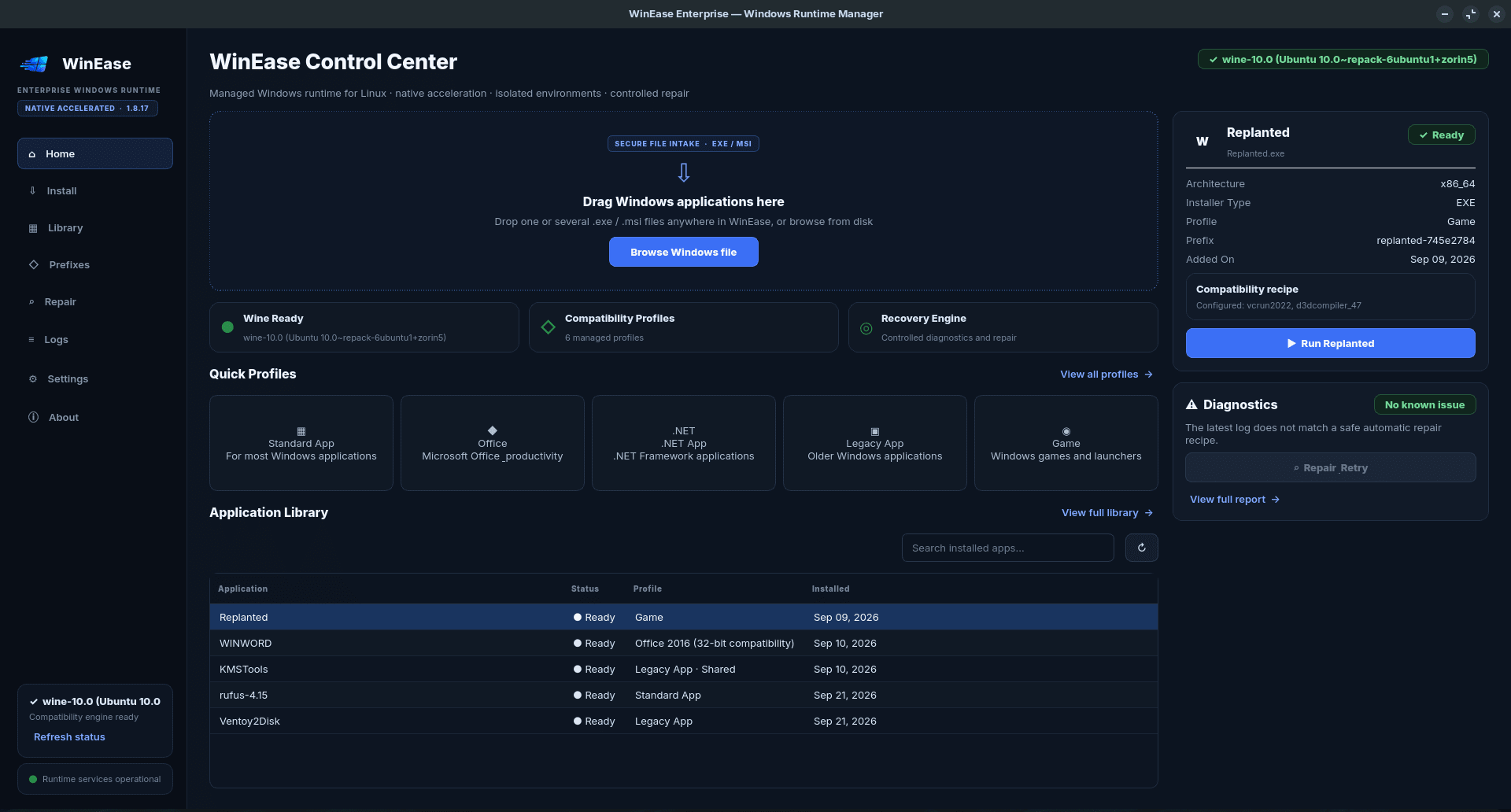
WinEase is an open-source Windows Application Manager for Linux designed to simplify the installation, configuration, management, and maintenance of Windows applications running through Wine.
Instead of requiring users to manually configure Wine prefixes, execute complex terminal commands, manage dependencies, and troubleshoot individual Windows applications, WinEase provides a centralized graphical interface for these operations.
The application supports Windows EXE and MSI installers, dedicated and shared Wine environments, application management, Microsoft Office compatibility tools, Wine configuration, runtime maintenance, repair operations, and diagnostic utilities.
WinEase also includes gaming-oriented functionality with support for Vulkan-based environments and GameMode, helping users prepare Wine environments for Windows games and other graphics-intensive applications.
The graphical interface is built using Python and PySide6/Qt, while performance-sensitive functionality can use a native C++20 accelerator. The project is designed specifically for Linux systems and integrates with Wine and Wine32 while maintaining a user-friendly desktop workflow.
WinEase aims to reduce the complexity normally associated with Wine administration by placing application installation, environment management, configuration, maintenance, and troubleshooting into one organized desktop application.
The v1.8.17 release underwent source validation, release checks, native accelerator compilation, Linux runtime preflight testing, and automated testing before being prepared as an open-source release.
Key Features
• Install and launch Windows EXE applications
• Install Windows MSI packages
• Drag-and-drop installer workflow
• Wine prefix and environment management
• Shared and application-specific environments
• Microsoft Office compatibility utilities
• Wine configuration tools
• Application maintenance and repair utilities
• Environment diagnostics
• Vulkan support
• Linux GameMode integration
• Gaming-oriented Wine configuration
• Native C++ acceleration components
• Professional PySide6/Qt desktop interface
• Linux runtime preflight validation
• Open-source architecture
Technology Stack
Python 3
PySide6 / Qt
Wine
Wine32
C++20
Vulkan
GameMode
Linux
Release Validation
WinEase v1.8.17 completed its release validation with:
• 95/95 automated tests passing
• Native C++ accelerator successfully compiled
• Wine runtime preflight validated
• Wineboot and Winecfg integration validated
• Office runtime checks validated
• Gaming runtime checks validated
• GUI smoke testing completed
• Open-source release structure validated
Problem
Wine makes it possible to run many Windows applications on Linux, but configuring and maintaining Wine environments can be difficult for users who are unfamiliar with prefixes, Windows dependencies, environment variables, runtime components, command-line utilities, and application-specific configuration.
Installing applications such as Microsoft Office or Windows desktop software may require multiple manual steps. Different applications may also require separate Wine environments, configuration changes, additional dependencies, or troubleshooting.
Managing all of these operations directly through the Linux terminal can quickly become complicated, especially when multiple Windows applications are installed.
02 / SolutionSolution
WinEase provides a centralized graphical Windows application management environment for Linux.
The application allows users to install EXE and MSI packages, create and manage Wine environments, configure application prefixes, launch installed Windows programs, perform maintenance operations, and diagnose environment problems from a professional desktop interface.
WinEase also integrates Office-oriented tools and gaming features including Vulkan and GameMode support.
By combining Wine management, application installation, environment configuration, diagnostics, maintenance, and compatibility tooling into a single interface, WinEase reduces the amount of manual command-line configuration normally required when using Wine.
03 / ChallengeChallenge
One of the major development challenges was creating a graphical management layer without hiding the flexibility of Wine itself.
WinEase needed to handle different Wine environments, application installers, prefixes, runtime configurations, Microsoft Office requirements, graphics components, gaming optimizations, and maintenance operations while presenting these features through a consistent user interface.
Another challenge was maintaining reliable interaction between the Python/PySide6 frontend, native Linux components, Wine processes, and the optional native C++ acceleration layer.
The project also required extensive validation to ensure its runtime components, GUI workflow, Wine integration, and open-source release structure worked together correctly.
04 / OutcomeOutcome
WinEase evolved into a complete Linux desktop application for managing Windows software through Wine.
Version 1.8.17 provides an integrated environment for Windows application installation, Wine prefix management, Office compatibility, gaming configuration, maintenance, repair, and diagnostics.
The release successfully completed its automated test suite, native accelerator compilation, Linux runtime preflight validation, and GUI smoke testing.
The project now provides a foundation for continued development of a more accessible Windows application management experience on Linux.