Project / Overview
THE BUILD
BEHIND IT.
Linux Spectre 1.0 is an independent Linux operating system project I developed to combine everyday desktop productivity with accessible cybersecurity capabilities.
The idea came from my experience and interest in Kali Linux, which is primarily designed for penetration testing and security assessment. I wanted an operating system that I could comfortably use for programming, internet browsing, studying, software development, and normal daily activities while still having access to cybersecurity tools whenever needed.
I also drew inspiration from the streamlined desktop customization of the Ghost Spectre Windows project. Instead of creating another dedicated penetration-testing distribution, I wanted to build a distinctive Linux desktop around the Debian ecosystem.
One of its main features is Spectre ToolHub, a native GTK4-based desktop application featuring a catalog of 760 cybersecurity-tool entries. Rather than installing every tool directly into the host operating system, ToolHub manages a separate Kali Rolling environment through rootless Podman. Users can discover and install selected supported packages on demand.
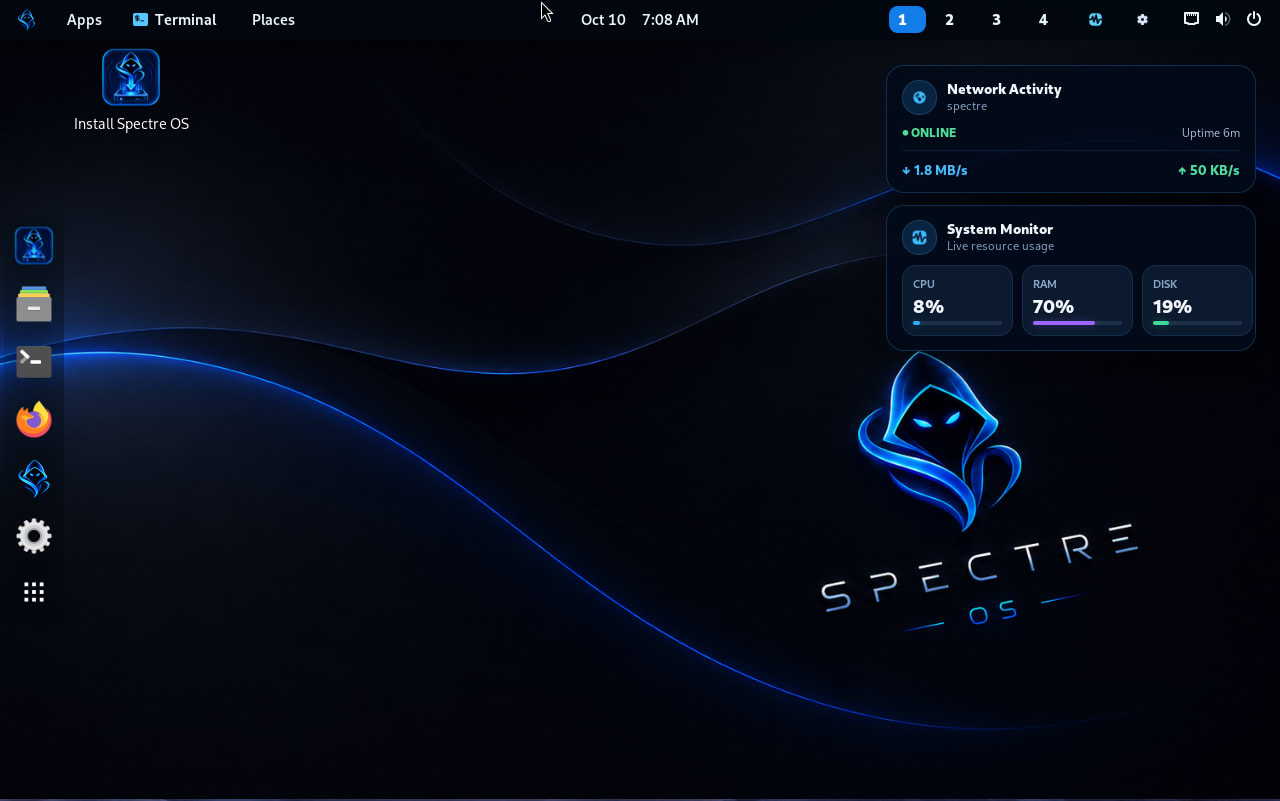
Linux Spectre 1.0 also includes a custom 7.1.8-spectre Linux kernel, Spectre-themed GNOME desktop, branded login interface, desktop monitoring utilities, and a bootable graphical installation ISO.
Throughout development, I addressed challenges involving kernel integration, VirtualBox display compatibility, Linux account provisioning, container persistence, and reproducible ISO builds.
The result is a working Linux operating system that combines general-purpose desktop computing with an organized environment for authorized cybersecurity learning and testing.
Linux Spectre demonstrates my practical experience in Linux system integration, desktop application development, Python, containerization, troubleshooting, and software release engineering.
Problem
As a programmer and cybersecurity enthusiast, I wanted an operating system that could support both my everyday computing activities and technical security work.
Kali Linux provides an extensive penetration-testing environment, but its primary focus is security assessment. For my own daily workflow, I wanted a more general-purpose desktop where I could write code, browse the internet, work on projects, and study without maintaining a separate dedicated security operating system.
Installing numerous penetration-testing packages directly into a conventional Linux desktop could also introduce dependency conflicts, unnecessary packages, and additional maintenance.
The challenge was to design an operating system that combines a comfortable daily Linux experience with convenient access to cybersecurity tools, while keeping the two software environments reasonably separated.
02 / SolutionSolution
I developed Linux Spectre 1.0, a customized Debian-based Linux operating system with a GNOME desktop, custom kernel, graphical installer, and an integrated application called Spectre ToolHub.
Spectre ToolHub provides an organized catalog of 760 cybersecurity-tool entries and manages a separate Kali Rolling container using rootless Podman.
Instead of installing all security utilities directly onto the main operating system, users can select supported packages and install them through Kali's APT package repositories when needed.
This design keeps the host desktop's package environment separate from the Kali tool environment, reducing direct package-management conflicts and making specialized tools easier to organize.
I also integrated the tested VirtualBox display components and rootless container provisioning into the installation image, allowing newly installed systems to reproduce these features without repeating the original manual fixes.
03 / ChallengeChallenge
Developing Linux Spectre involved several technical challenges beyond desktop customization.
One challenge was configuring rootless Podman automatically. During testing, the account-provisioning service encountered system account database locks, preventing subordinate UID and GID mappings from being configured reliably. I improved the service initialization and retry behavior to resolve the issue.
Another challenge involved VirtualBox display compatibility. The custom Linux kernel complicated conventional Guest Additions installation because matching kernel headers were unavailable for the vendor module-building process. I integrated the verified VirtualBox userspace components into the operating-system build instead of relying on unnecessary kernel-module recompilation.
I also had to ensure that Kali tools remained installed after reboot and that fixes applied during development were incorporated permanently into the authoritative source code.
These issues required Linux troubleshooting, systemd service configuration, container management, ISO engineering, and repeated clean-install testing.
04 / OutcomeOutcome
The project resulted in a complete, installable Linux Spectre 1.0 operating-system image that passed ISO integrity checks and fresh-installation testing in VirtualBox.
The tested installation successfully booted into the customized GNOME desktop using the 7.1.8-spectre kernel. VirtualBox display services initialized automatically, and rootless Podman provisioning completed successfully.
Spectre ToolHub also demonstrated a working Kali container environment. Nmap 7.99 was installed and executed successfully, and testing confirmed that the installed package remained available after restarting the operating system.
The approximately 1.8 GB installation ISO passed SHA-256 verification, with the major software components retained in the cumulative build.
Beyond producing a functioning Linux system, the project strengthened my practical skills in Linux internals, Python desktop development, software integration, troubleshooting, containerization, automation, and release engineering.
Linux Spectre represents my goal of bringing everyday productivity and cybersecurity learning together in one personalized Linux environment.